 modopodo
An AI note organizer that titles, tags and files every note
In short
Modopodo is an AI note organizer that files your notes for you. Each note you speak or type automatically gets a title, a short summary, a kind, a theme, tags, and the people, places and projects it mentions. When you correct a theme or kind, it learns and files future notes the same way.
Most notes apps assume you will organize as you go: choose a folder, add tags, write a title. In practice the inbox grows, the folders go stale and you stop trusting the system. An AI note organizer flips that. You just capture; the app does the filing.
What does an AI note organizer actually do?
It reads each note when you save it and adds the structure you would otherwise add by hand. In Modopodo that happens for every note, spoken or typed, with no setup.
| Field | What it is |
|---|---|
| Title | A short, readable name for the note |
| Summary | One or two lines on what the note says |
| Kind | Thought, idea, reflection, question, insight, plan, feeling, memory, learning or quote |
| Theme | The area of your life it belongs to, such as Work, Health or a project |
| Tags | Keywords for finer grouping |
| Entities | People, places and projects the note mentions |
How does automatic note organization work, step by step?
- You capture
Type in one field or record your voice. Text saves instantly and works offline; it syncs and gets organized when you are back online.
- Modopodo reads the note
It works out what the note is about and what kind of thought it is.
- It files the note
The note gets a title, summary, kind, theme and tags, and is linked to the people, places and projects it mentions.
- It connects related notes
Each note shows related notes, including older ones you may have forgotten.
- You correct if needed
Change a kind or theme, rename or merge themes. Future notes follow your choices.
Example: three messy notes, organized
Say you capture these over one afternoon, in no particular order:
- “Why do I always say yes to Friday meetings when I know I’m wiped by then?” becomes a question in Work, titled “Saying yes to Friday meetings”.
- “Read that sleep is more about consistency than hours. Try same wake time all week.” becomes a learning in Health, titled “Consistent wake time over total hours”.
- “Podcast idea: interviews with people who changed careers after 40.” becomes an idea in a Side projects theme, titled “Career-change podcast”.
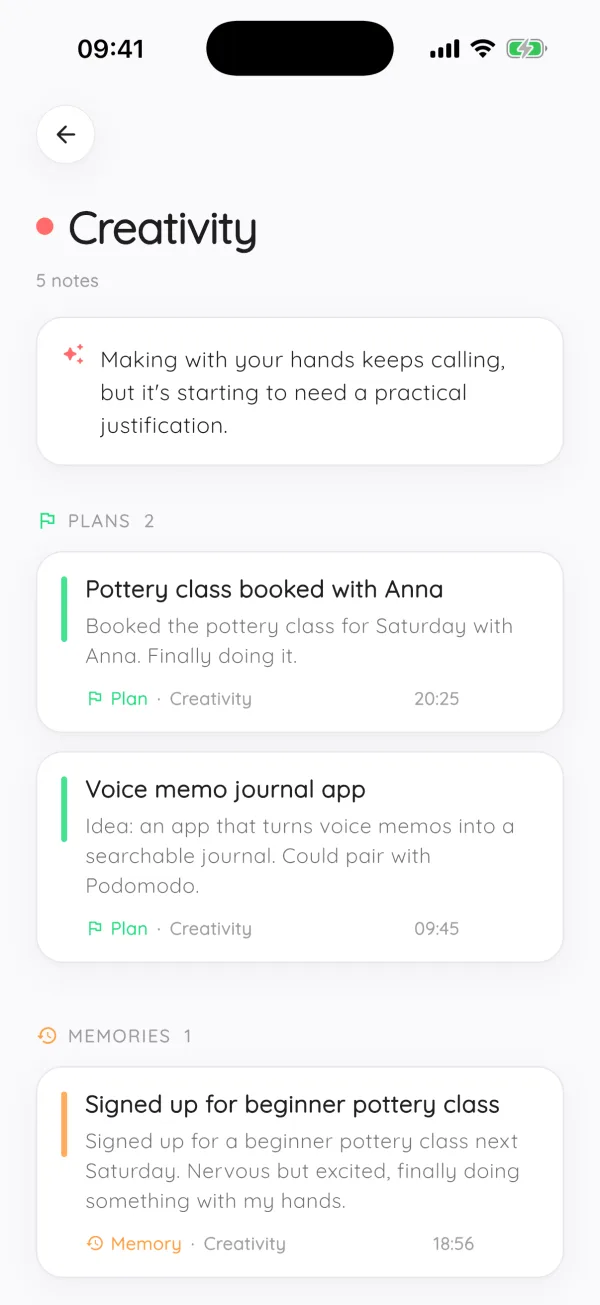
Nothing was tagged by you. Later, the Work theme shows a one-line summary of what has been going on there, and the Friday-meetings question sits next to other notes about energy and scheduling.
Can I fix how notes are filed?
Yes, and the corrections stick. Change a note’s kind or theme, rename a theme, or merge two themes that overlap, and Modopodo files future notes the same way. This is what keeps the structure feeling like yours instead of the AI’s guess.
How do I find things once they are organized?
There are several ways in, depending on how you remember something:
- By theme, with a one-line summary of each area of your life.
- As a timeline, when you remember roughly when you had the thought.
- By person, to see everything you noted about a colleague, friend or family member.
- By meaning, with semantic search that finds notes even when you do not remember the words.
AI note organizer vs folders and tags
Folders and manual tags give you full control but cost effort on every note. Systems like PARA work well for project material if you keep them up. Modopodo is aimed at a different job: personal thinking, where notes are short, frequent and messy, and the main risk is that you never capture them at all. For a broader view, read how to organize notes.
Can I take my notes with me?
Yes. You can export all notes as Markdown at any time, and you can delete your account and all data whenever you want.
What kinds of notes does Modopodo recognize?
Every note gets one of ten kinds. Kinds let you look at a theme from different angles, for example all the open questions about your job, or every plan you have made for the house.
| Kind | Example note |
|---|---|
| Thought | “Funny how the commute is the only quiet hour I get.” |
| Idea | “A shared shelf for borrowed tools in our building.” |
| Reflection | “The trip went better once I stopped planning every day.” |
| Question | “Do I actually want the promotion, or the title?” |
| Insight | “I write more when I don’t open email first.” |
| Plan | “Book the dentist, then sort out the car insurance.” |
| Feeling | “Anxious about the review on Thursday.” |
| Memory | “Grandpa teaching me to fish at the lake.” |
| Learning | “Compound interest works against you on credit cards too.” |
| Quote | “What gets measured gets managed,” from a talk I watched. |
Why themes work better than folders for personal notes
Folders force a decision at the moment of capture, when you least want to make one. Themes are assigned after the fact and can be renamed or merged as your life changes. A theme like “New job” can grow for months and then be merged into “Work” without you moving a single note.
Frequently asked questions
Is there an app that organizes notes automatically?
Yes. Modopodo automatically gives every note a title, summary, kind, theme and tags, and links the people, places and projects it mentions. You do not create folders or tags yourself, though you can correct anything.
Can AI tag my notes for me?
Yes. Modopodo adds tags to every note when you save it, along with a theme and a kind such as idea, plan or question. If you change a theme or kind, it learns and applies your choice to future notes.
What is the best AI note taking app for personal notes?
It depends on whether you want a workspace or a thinking tool. Tools like Notion suit structured project documents. Modopodo is built for personal thoughts: fast voice or text capture, automatic organization, and reflections on your notes.
Does automatic organization work offline?
Text notes save instantly offline and sync later, and voice notes recorded offline are transcribed once you reconnect. The AI organization runs once the note reaches the server, so titles, themes and tags appear when you are back online.
Can I import my existing notes into Modopodo?
No. There is no importer for notes from other apps, and Modopodo does not import handwriting, images or PDFs. It is designed as the place you capture new thoughts from now on, and you can export everything as Markdown whenever you want.
What if the AI files a note in the wrong theme?
Move it to the right theme or change its kind. Modopodo learns from those corrections and files similar notes the same way afterwards. You can also rename or merge themes.