 modopodo
How to capture ideas while walking, without losing them
In short
The easiest way to capture ideas while walking is to speak them into a voice notes app that transcribes as you talk. Modopodo shows your words live, then titles each note and files it by theme, so a 20-second idea from your walk is organized and searchable by the time you get home.
Why do the best ideas come while walking?
Walking, showering and commuting give your mind room to wander, which is often when connections appear. The problem is that these are exactly the moments when you can’t easily write anything down.
There is research behind the walking part: in a series of Stanford experiments, people generated more creative ideas while walking than while sitting (Oppezzo & Schwartz, 2014). Whatever the reason, the pattern is familiar. You solve the problem on the walk to the train, then lose it by the time you sit down. Typing on a phone while walking is awkward, and regular voice memos pile up as unnamed recordings you never replay.
What is the fastest way to capture an idea on the go?
Speak it. Talking is usually faster than typing on a phone, and you can keep your eyes up. The key is an app that turns the recording into searchable text, not just another audio file.
| Method | Speed | Findable later? |
|---|---|---|
| Typing a note | Slow while moving | Yes, if you file it |
| Voice memo recording | Fast | Rarely: audio is hard to search |
| Texting yourself | Medium | Buried in chat |
| Modopodo voice note | Fast, live text as you speak | Yes: titled, filed by theme, searchable by meaning |
How to capture ideas on the go with Modopodo
- Open and tap the mic
Start talking. Your words appear as you speak, so you can glance and see that it caught you.
- Say the idea plus why
“Idea for the newsletter: compare our onboarding to a hotel check-in. Because both are about making someone feel expected.” The “because” is what future you needs.
- Put the phone away
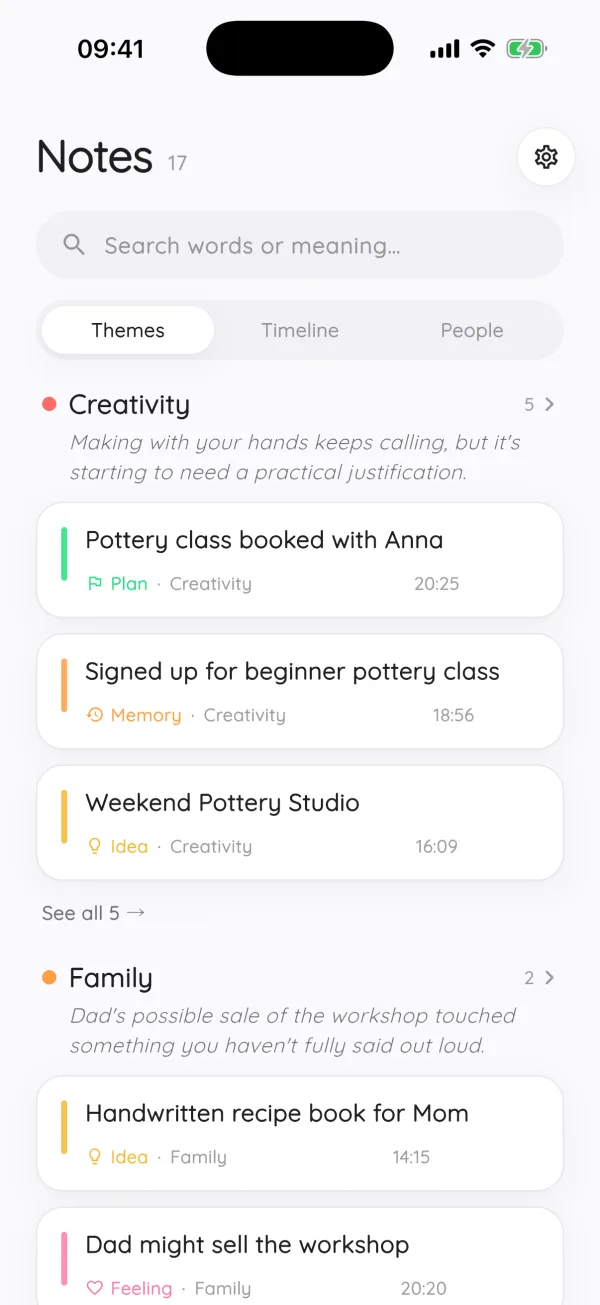
Modopodo adds a title, summary, kind (idea, plan, question, thought), a theme and tags. No filing on the sidewalk.
- Find it later
At your desk, open the theme, scroll the timeline, or search by meaning: “hotel onboarding thing” will find it.
- Watch it grow
If you keep returning to the same idea on different walks, Modopodo threads those notes into one idea page with open questions and a next step.
Modopodo handles many languages and lets you switch languages in a single note, which helps if you think in more than one. When there is no signal, text notes save instantly and sync later, and a voice note you record is kept and transcribed once you are back online.
Can you take voice notes while driving?
Only if you can do it without looking at or handling your phone, and local laws allow it. Modopodo has no hands-free trigger or car integration, so you need to open the app and tap to record.
The safe approach: pull over somewhere safe, or wait until you stop, and say the idea then. If you are worried about forgetting, repeat a single keyword to yourself until you can stop. Many places restrict handheld phone use while driving, so check the rules where you live. No idea is worth an accident.
Tips for capturing ideas on the go, with any app
- Put your capture app on the home screen dock. Every swipe you save makes capture more likely.
- Capture in one place. Splitting ideas across voice memos, notes and chats means you won’t find them. Our guide on how to remember your ideas explains why one inbox works.
- Say the context. Where you were and what triggered it helps you make sense of it later.
- Review weekly. A quick weekly reflection turns captured ideas into decisions.
- Try voice journaling on walks. Some people use their daily walk for a few minutes of voice journaling.
What should you say in a quick voice note?
The idea in one sentence, why it matters, and anything that would help you pick it up later. Twenty to forty seconds is usually enough.
- The idea: “Run the team retro as a walk instead of a meeting.”
- The reason: “People talk more openly side by side than across a table.”
- The context: “Thought of this after the walk with Jonas today.”
- The open question: “Would remote people feel left out?”
Modopodo might file that as an idea under a theme like “Team”, tag Jonas, and suggest “worth exploring” follow-ups. If you mention the retro idea again next month, the two notes end up connected.
What Modopodo doesn’t do on the go
- No hands-free activation, Apple Watch app or car integration. You open the app and tap to record.
- No reminders. If an idea is really a task with a deadline, put it in your task app or calendar.
- Audio isn’t kept. Modopodo keeps the transcript, not the recording, so it isn’t the right tool for saving music or sounds.
- iPhone and web only. There is no Android app yet.
For a closer look at the capture side, see the voice notes app feature page.
Frequently asked questions
What is the best way to capture ideas while walking?
Speak them into an app that transcribes as you talk, so the idea becomes searchable text rather than an audio file. Say the idea and why it matters in one or two sentences. Modopodo then titles and files the note automatically.
Is it safe to record voice notes while driving?
Only if you don’t need to look at or handle your phone, and the law where you live allows it. Modopodo requires opening the app and tapping to record, so pull over or wait until you are stopped.
Can I take notes hands-free on iPhone?
Modopodo doesn’t offer hands-free activation; you tap to start recording, and then you can talk without typing. Apple’s built-in features may offer other hands-free options, depending on your device and settings.
Does Modopodo keep my audio recordings?
No. Audio is transcribed and not kept on Modopodo’s servers. You keep the text, which is titled, filed and searchable.
Does Modopodo work without internet?
Yes, for capture. Text notes save instantly offline and sync later. Voice notes recorded offline are kept and transcribed once you reconnect. Titles, themes and the rest of the organization are added when you are back online.