 modopodo
An app for overthinking: get thoughts out of your head
In short
An app for overthinking gives looping thoughts somewhere to go outside your head. With Modopodo you say or type what is on your mind, and it titles and sorts each thought so you can see which ones are plans, questions or worries and which keep coming back. It is a thinking tool, not a treatment or medical service.
Why do thoughts keep looping?
Often because they have nowhere else to go. A thought you haven’t written down or acted on tends to stay in the background, and your mind keeps replaying it so it won’t be forgotten.
You replay the meeting. You draft the reply to the text four times in your head. You lie in bed at 1 am planning a conversation that may never happen. It isn’t that you don’t know you are overthinking. You just can’t find a way to set it down. Getting the thoughts out of your head and somewhere you trust won’t solve the underlying situation, but it can make it easier to see what you are actually dealing with. (This page is about everyday overthinking. It isn’t medical advice. If racing thoughts are affecting your sleep, work or wellbeing, talk to a doctor or mental health professional.)
Does writing thoughts down actually help?
There is some research support for writing worries down, and it suggests that how you write matters.
- In a classroom study, students who spent 10 minutes writing about their worries before an exam did better than those who didn’t, especially students who were usually anxious about tests (Ramirez & Beilock, *Science*, 2011).
- In a sleep-lab study at Baylor University, people who wrote a specific to-do list for five minutes before bed fell asleep faster than those who wrote about tasks they had already completed (Scullin et al., 2018, via ScienceDaily).
- Research on rumination by Edward Watkins and colleagues distinguishes abstract thinking (“why am I like this?”) from concrete thinking (“what exactly happened, and what could I do next?”) and finds the concrete mode tends to be more helpful (Watkins, 2009).
How to use Modopodo when your mind won’t stop
- Say it all, unfiltered
Tap and talk. Don’t try to make sense. Words appear as you speak, so you can watch the jumble become text.
- Let it be sorted
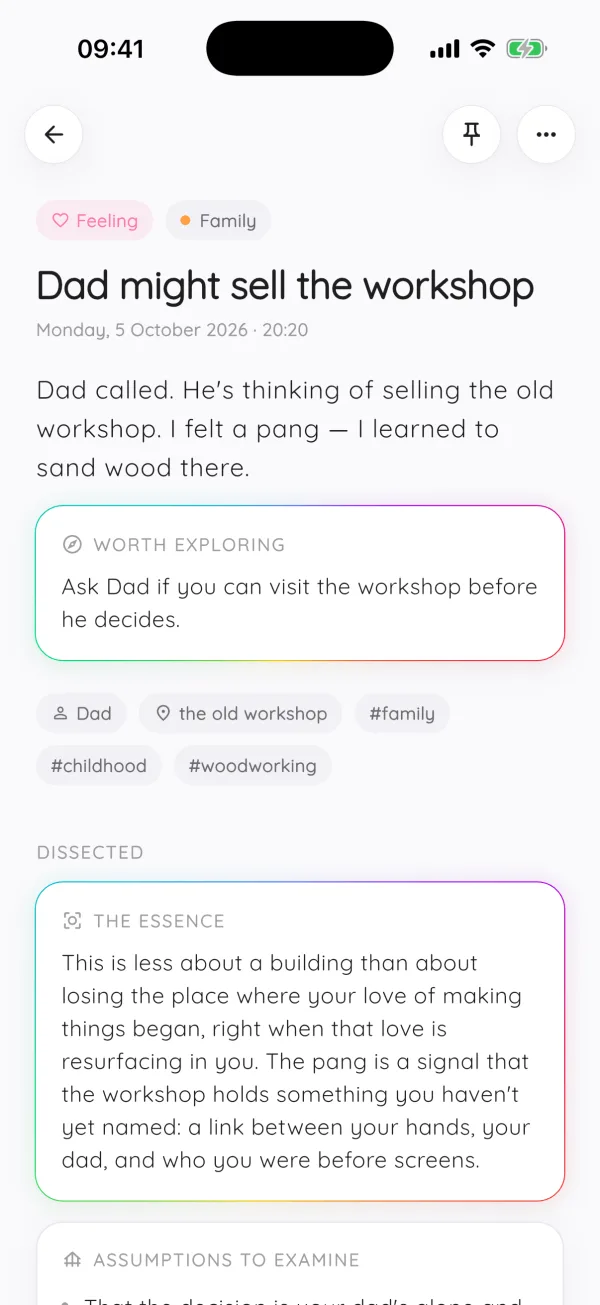
Modopodo titles each note and labels its kind: a feeling, a question, a plan, a thought. Seeing that half of what kept you up is two small plans and one question is often calming in itself.
- Make one thing concrete
Pick the loudest note and add one line: what exactly happened, and what is one small next step? Then close the app.
- Notice what returns
After a few weeks, a reflection might point out that the same worry shows up every Sunday night, or that a fear you mention often never actually happened. Pin what rings true.
- Dissect a sticky thought
For a belief that keeps looping (“they think I’m incompetent”), Dissect shows its hidden assumptions and counterpoints. It doesn’t tell you what to feel, but it gives you another angle.
What to do about overthinking at night
- Do a two-minute dump before bed, not in bed. Capture everything, then put the phone down.
- Turn worries into specific next steps where you can: “call the bank at 9” rather than “money stuff”.
- Give unanswerable questions a time slot. Note them, then decide to look at them tomorrow afternoon.
- Keep it short. Long late-night journaling can turn into more looping. Our guide on how to stop overthinking covers this in more depth.
If your thoughts are more scattered than looping, see the page on brain dumps for ADHD minds or the general brain dump guide.
What is the difference between reflecting and ruminating?
Reflecting moves toward understanding or a next step. Ruminating goes in circles, replaying the same thought without getting anywhere.
A rough test: after ten minutes, do you know something you didn’t, or have you decided anything? If not, you are probably looping. Writing can tip either way. Pages of “why does this always happen to me” can feed the loop, while a few lines about what happened, what you felt and what you could try tend to settle it. Modopodo is built to encourage the second kind: notes are short, each gets a clear title and kind, and the Dissect view turns a vague worry into specific assumptions you can look at. If you notice yourself using any journal to replay the same thought for hours, close it and do something physical for a while.
What Modopodo doesn’t do for overthinking
- It isn’t therapy or a treatment. It doesn’t diagnose, treat or monitor anxiety or any other condition.
- It isn’t a crisis service. If you are in distress or might hurt yourself, contact local emergency services or a crisis line right away.
- It doesn’t guide you in real time. No breathing exercises, meditations or chat-based coaching.
- AI reflections can be wrong. They are observations about your notes, not facts about you.
Frequently asked questions
How do I get thoughts out of my head?
Write them down or say them out loud somewhere you trust, without sorting them first. Then pick one and make it concrete: what exactly happened, and what is one next step. Modopodo lets you speak the thoughts and sorts them for you.
Does journaling help with overthinking?
It can help, especially when you write specifically about what happened and what you could do, rather than asking abstract “why” questions over and over. Long, circling journaling can make some people feel worse, so keep sessions short and concrete.
What is a good app for racing thoughts?
One that captures fast, without making you organize. Voice capture tends to keep up with racing thoughts better than typing. Modopodo transcribes as you speak and sorts notes afterward. If racing thoughts are persistent or distressing, talk to a doctor or mental health professional.
Why do I overthink at night?
At night there are fewer distractions, so unfinished thoughts and worries get more attention. Research has found that writing a specific to-do list before bed helped people fall asleep faster. A short brain dump before bed can be worth trying.
Is Modopodo a mental health app?
No. Modopodo is a personal thinking and journaling tool. It doesn’t diagnose or treat any condition, and its AI output is not medical advice.