 modopodo
A brain dump app for ADHD minds: say it, then let it go
In short
A brain dump app for ADHD should let you capture a thought in seconds and do the sorting for you. Modopodo lets you talk or type without choosing a folder, then gives each thought a title, a theme and a kind (idea, plan, feeling, question), so you can find it later. It organizes thoughts; it is not a treatment.
Why do ADHD thoughts get lost so easily?
Thoughts arrive fast, all at once, and at bad moments, and most notes apps make you decide where something goes before you can save it. That small decision is often where the thought dies.
Maybe you know the pattern. A great idea in the shower, gone by the time you dry off. Five apps with half-finished notes, a “misc” folder with 400 items, sticky notes on the laptop. You don’t lack ideas or intentions. What you lack is a place that accepts everything instantly and doesn’t require you to be organized at the moment of capture. (This page describes common experiences people with ADHD talk about. It isn’t medical advice, and Modopodo isn’t a treatment for anything.)
What makes a good brain dump app for ADHD?
The best ADHD notes app is the one with the fewest steps between “I just thought of something” and “it’s saved”. After that, it should sort things for you and make them easy to find again.
| Need | Why it matters | In Modopodo |
|---|---|---|
| One-tap capture | Every extra step is a chance to get distracted | Open, tap, talk. Or type in one field |
| No filing decisions | Choosing a folder breaks the flow | Title, theme, kind and tags are added for you |
| Messy input is fine | Thoughts come out tangled | One rambling note can still get a clear title and summary |
| Find it later | You won’t remember the exact words | Search by meaning, by theme, by person or on a timeline |
| Notice repeats | The same idea comes back for months | Related notes thread into one growing idea page |
How to do an ADHD brain dump with Modopodo
- Open and talk
Tap the mic and say everything on your mind. Don’t sort, don’t finish sentences. Words appear live as you speak.
- Split it if you want, or don’t
One long dump is fine. You can also save each thought separately, which helps the theme pages stay clean.
- Walk away
Modopodo adds a title, a short summary, a kind (idea, plan, question, feeling and so on), a theme, tags and any people or projects you mentioned.
- Come back when you have energy
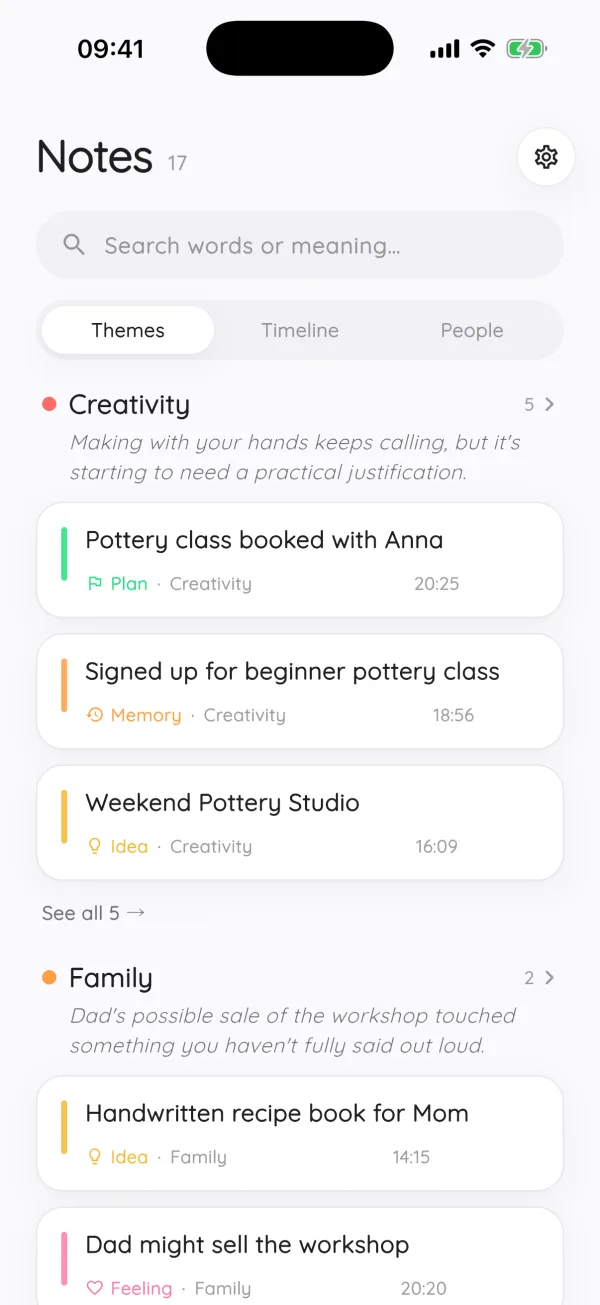
Open a theme like “Side project” or “Apartment” and see everything you said about it, grouped by kind, with a one-line summary of where it stands.
- Correct it once
If it files something wrong, change the theme or kind. Future notes learn from your corrections.
Here is what one 60-second dump might turn into:
- “Podcast idea about repair cafés” → idea, theme Side project
- “Need to email the landlord about the heater” → plan, theme Apartment, mentions landlord
- “Why do I always start the hard thing at 11 pm?” → question, theme Self
- “Feeling behind on everything this week” → feeling, theme Work
Brain dump tips that help even without an app
- Capture first, sort later. Mixing the two is the fastest way to abandon a dump. Our brain dump guide walks through the technique.
- Use voice when your hands or attention are busy. Talking is often faster than typing, and you can do it while pacing.
- Keep one inbox. Five capture apps means five places to forget about. Pick one and send everything there.
- Make plans specific when you get to them. “Email landlord about heater, Tuesday” is easier to act on than “apartment stuff”.
- Set a short limit. Two to five minutes is enough. The goal is to get things out of your head, not to write an essay.
How do you find a thought you dumped weeks ago?
Search for what it was about, not the exact words. Modopodo searches by meaning as well as by keywords, so “that thing about fixing old electronics” can find the note where you said “repair café podcast”.
You can also browse. Each theme page groups notes by kind, so all your ideas for the side project sit together, separate from the worries and plans. The timeline shows what you captured on a given day, and the people view collects everything you said about one person. When an idea keeps coming back across weeks, Modopodo threads those notes into a single idea page that shows how it changed and suggests a next step. That way, a thought you had five times in five different moods ends up in one place instead of five.
What Modopodo doesn’t do for ADHD
Being clear about this saves you a frustrating week.
- It isn’t a task manager or calendar. It recognizes a note as a plan, but it won’t send reminders, set due dates or check things off. Use a task app for that. Podomodo, from the same maker, handles tasks and focus timers.
- It isn’t medical support. It doesn’t diagnose, treat or track symptoms, and AI output is not medical advice.
- It won’t make you review your notes. It makes reviewing easy, but there are no nudges or streaks.
- iPhone and web only. No Android app yet.
If thoughts loop rather than scatter, the page on Modopodo for overthinking may fit better. And if you capture mostly on foot, see capturing ideas while walking.
Frequently asked questions
What is a brain dump for ADHD?
A brain dump means getting every thought, task and worry out of your head and onto a page or into an app without stopping to organize. Many people with ADHD use it to reduce the feeling of juggling too many open loops. You sort afterward, or let an app do it.
What is the best app for ADHD thoughts?
Look for the fewest steps to capture, no forced folders, and good search. Modopodo fits if you like talking your thoughts out and want them titled and sorted automatically. If you mainly need reminders and due dates, a task manager is a better primary tool.
Should I organize thoughts while I brain dump?
Usually not. Organizing while capturing adds decisions and makes it easier to stop halfway. Dump first, then sort, which in Modopodo happens automatically after you save.
Can I use a brain dump app without an ADHD diagnosis?
Yes. Brain dumping is a general technique for anyone with a busy mind. Modopodo doesn’t ask about diagnoses and isn’t a medical tool.
Is voice or text better for an ADHD brain dump?
Many people find voice faster because talking keeps up with racing thoughts and works while moving. Text is better in quiet places or when you need to be discreet. Modopodo supports both, and text capture works offline.
Does Modopodo send reminders?
No. Modopodo is for thinking, not task management, so it doesn’t schedule reminders or due dates. Move actionable items into a task app or calendar.