 modopodo
An AI journaling app that reads your entries and reflects back
In short
An AI journaling app lets you write or speak entries and then uses AI to organize them and point out patterns. Modopodo, an iPhone journal app, titles and files every entry by theme, then on request reflects back recurring themes, blind spots and tensions, with each insight tied to your own notes.
Why do so many people stop journaling?
Most people quit because the journal asks for effort and gives little back. You fill pages, rarely reread them, and the one useful pattern (that every Sunday night you dread the same meeting) stays buried in a notebook you never open again.
If that sounds familiar, you probably have three problems at once: a blank page that feels like homework, entries that are hard to find later, and no one to read them and say “have you noticed this?” An AI journaling app is worth trying only if it helps with all three. If it just adds a chatbot on top of a text box, it won’t change much.
What does an AI journaling app actually do?
It takes care of the parts of journaling that aren’t writing: filing, finding and rereading. In Modopodo you speak or type, and the app handles the rest.
- Capture without a ritual. Tap and talk. Words appear as you speak, in many languages, and you can switch languages in the same entry. Or type into a single field that saves instantly, even offline.
- Automatic filing. Every entry gets a title, a short summary, a kind (feeling, reflection, memory, plan, question and more), a theme such as “Work” or “Family”, tags, and the people and places it mentions.
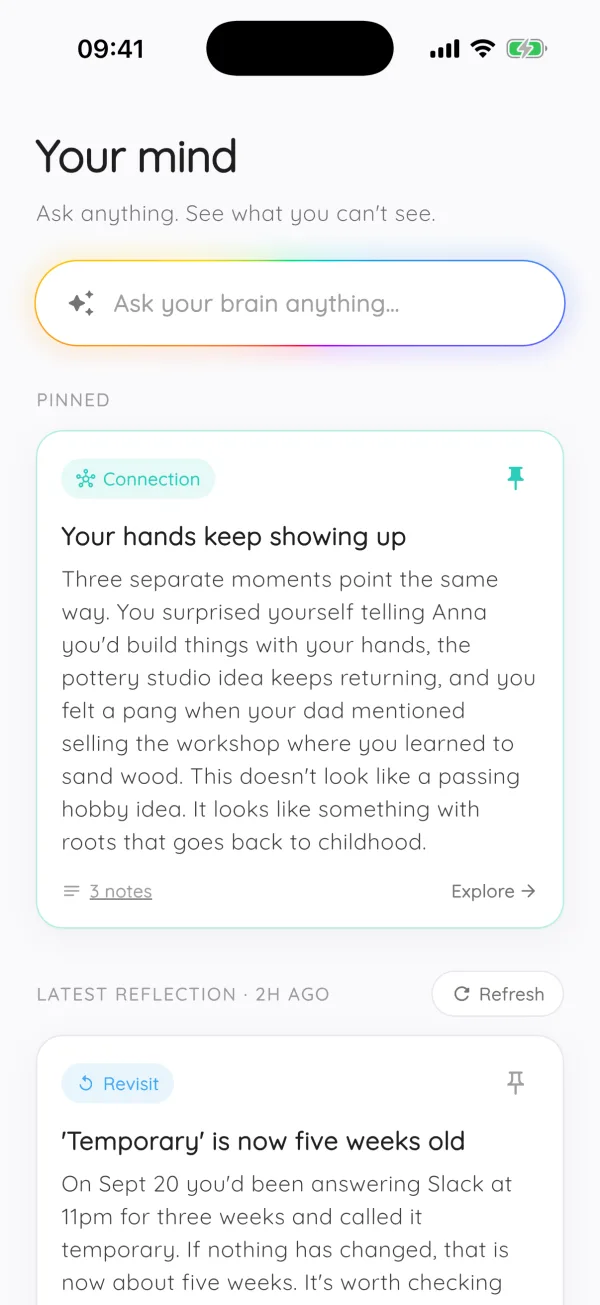
- Reflections when you ask. Modopodo reads across your entries and returns insights, blind spots, tensions, patterns, connections and questions. Pin the ones that ring true and refresh the rest.
- Answers from your own past. Ask “When did I start feeling stuck at work?” and get an answer with citations that link to the entries it came from.
How to journal with Modopodo: a typical week
Here is what a light, realistic week looks like. None of these entries took more than two minutes.
| What you said | Title it gets | Kind | Theme |
|---|---|---|---|
| “Snapped at Sam again during the planning call. I think I was tired, not angry.” | Snapping at Sam when tired | reflection | Work |
| “Mom called. She sounded lonely. I keep meaning to visit and keep not doing it.” | Putting off visiting Mom | feeling | Family |
| “Long walk by the canal, first time in weeks my head felt quiet.” | Quiet head on the canal walk | memory | Health |
| “Maybe I say yes to too many things because I hate disappointing people?” | Saying yes to avoid disappointing | question | Self |
By Sunday you have a timeline of the week and theme pages that each carry a one-line summary of what is going on in that part of your life. Ask for a reflection and Modopodo might point out that tiredness shows up in every entry where you feel short with people, or that “not wanting to disappoint” connects your work entries with the guilt about your mom. You decide what is true. Pin it, or refresh and move on.
Tips that make any journal app work better
These habits help whether you use Modopodo, a paper notebook or Apple Notes.
- Lower the bar
One honest sentence counts as an entry. Aim for frequency, not length. Our guide to journaling consistently goes deeper on this.
- Be concrete
Write “I froze when my manager asked about the deadline” rather than “work is stressful”. Specific entries are easier to learn from later, for you and for an AI.
- Tie it to something you already do
The walk home, the kettle boiling, brushing your teeth. Voice makes this easier because you don’t need a desk. See voice journaling.
- Reread on purpose
Once a week, look back. A short weekly reflection is where journaling pays off.
- Ask a better question
Swap “why do I always…” for “what happened right before…”. If you need a starting point, keep a short list of prompts you like.
Is an AI journal app private?
It depends on the app, so check before you pour your life into one. Modopodo stores notes in the EU (Frankfurt) and isolates each account at the database level. It uses Anthropic’s Claude for organization and reflections and OpenAI for transcription, and under their API terms that data isn’t used to train their models. Audio isn’t kept on Modopodo’s servers, and the app has no ads, tracking or analytics SDKs. You can export everything as Markdown or delete your account at any time. More on this in is AI journaling safe.
What Modopodo doesn’t do for journaling
- No photos, handwriting or PDFs. If your journal is a scrapbook, a dedicated app like Day One fits better. See Modopodo vs Day One.
- No shared journals. It is built for one person’s thinking.
- No guided daily templates or streak games. You capture freely, and Modopodo organizes afterward.
- The AI can be wrong. Reflections are suggestions to test against your own sense of things, not verdicts, and not medical advice.
- iPhone and web only. There is no Android app yet.
Frequently asked questions
What is the best AI journaling app for iPhone?
It depends on what you want from it. If you want prompts and a chat-style coach, apps built around guided conversations suit you. If you want to talk freely and have the app file entries and reflect patterns back from your own notes, Modopodo is built for that. We compare the options honestly in best AI journaling apps.
Can AI read my journal and find patterns?
Yes. Modopodo reads across your entries when you ask for a reflection and returns patterns, tensions, blind spots and questions, each based on what you actually wrote. Treat them as observations to check, since AI output can be wrong or incomplete.
Is it better to journal by voice or by typing?
Neither is better in general. Voice is faster and works while you walk or cook, and many people say more when they talk. Typing suits quiet places and careful thinking. Modopodo supports both, and entries end up in the same place.
Is journaling with AI safe?
It can be, if the app is clear about where data goes. Modopodo stores notes in the EU, uses AI providers whose API terms exclude training on your data, has no ads or tracking, and lets you export or delete everything. Avoid pasting very sensitive details into general-purpose chatbots whose data policies you haven’t read.
How much does Modopodo cost?
Modopodo starts with a 30-day free trial with full access. After that it costs $6.99 per month or $49.99 per year, and prices may vary by country. You can cancel anytime.
Does Modopodo work on Android?
Not yet. Modopodo is available on iPhone (iOS 15 or later), and subscribers can also use the web app in any browser.