 modopodo
How to Organize Notes: 6 Systems Compared and a Cleanup Plan
In short
To organize notes, pick one simple system and apply it consistently: a few broad folders, a short list of tags, a method like PARA or Zettelkasten, or an app that organizes notes automatically. Then clean up in stages: back up, archive everything old, sort only what is active, and spend ten minutes a week keeping it tidy.
Almost everyone’s notes end up the same way: hundreds of entries titled “New Note,” a few elaborate folders abandoned halfway through, and the nagging feeling that something important is buried in there somewhere. The problem is rarely a lack of discipline. It is usually a system that asks for more filing effort than real life allows.
This guide compares the six main ways to organize notes, helps you choose one that fits how you actually work, and gives you a step-by-step plan to clean up messy notes without losing a weekend to it.
What is the best way to organize notes?
The best system is the simplest one you will actually keep using. For most people that means a few broad categories plus good search, not a deep hierarchy of folders.
Before picking a system, answer three questions honestly:
- What do you mostly use notes for? Projects and work, learning and research, personal thinking and journaling, or a mix?
- How do you look for notes later? By browsing folders, by searching, or by remembering roughly when you wrote something?
- How much filing will you really do? If the answer is “almost none,” choose a system that works without it.
The 6 main note organization systems
1. Folders
Folders put each note in exactly one place, like a filing cabinet. They are intuitive and work well for clearly separate areas, such as Work, Home and Health. They break down when a note belongs in two places, and deep nesting (folders inside folders inside folders) makes notes harder to find, not easier. Keep it to one level, and five to ten folders at most.
2. Tags
Tags are labels, and a note can have several. They handle overlap well: a note can be tagged both “marketing” and “ideas.” Their weakness is drift. Without discipline you end up with “idea,” “ideas” and “ideas-2024” all meaning the same thing. A short, fixed tag list of 10 to 20 tags works far better than inventing new ones on the spot.
3. PARA
PARA, created by Tiago Forte, sorts everything into four categories by how actionable it is: Projects (short-term efforts with a goal), Areas (ongoing responsibilities that need attention), Resources (topics of interest) and Archives (anything inactive from the other three) (Forte Labs). Its strength is that it is organized around what you are working on now. Its weakness is that personal reflections and loose thoughts don’t fit neatly into any of the four. Read our full PARA method guide.
4. Zettelkasten
The Zettelkasten, or “slip box,” is the method associated with sociologist Niklas Luhmann, who produced nearly 600 publications with the help of about 90,000 note cards (Bielefeld University). Each note holds one idea, has a unique ID, and links to related notes with a short explanation of why they connect. It is excellent for building long-term understanding and for writers and researchers. It also takes the most effort per note. See our Zettelkasten method guide.
5. Date-based and search-first
Some people skip categories entirely. They write everything in a running daily log and rely on dates and search to find things later. This is fast to maintain and works well if your notes app has good search, but browsing by topic is hard, and you need to remember the right keywords.
6. Automatic AI organization
Newer apps use AI to title, tag and group notes for you as you capture them, and let you search by meaning rather than exact words. The appeal is obvious: the filing happens without you. The trade-offs are less control over the structure, the need to correct the AI when it gets something wrong, and the need to check how the app handles your data.
| System | Best for | Effort per note | Main weakness |
|---|---|---|---|
| Folders | Clearly separate areas | Low | Notes that fit two places |
| Tags | Overlapping topics | Low to medium | Tags drift and multiply |
| PARA | Projects and work | Medium | Loose thoughts don’t fit |
| Zettelkasten | Research, writing, deep learning | High | Slow; steep learning curve |
| Date-based / search | Daily logs, journaling | Very low | Hard to browse by topic |
| Automatic AI | People who won’t file | Very low | Less control; AI can misfile |
Should you use folders or tags?
Use both, lightly: a handful of broad folders for the big areas of your life, and a short list of tags for things that cut across them, like “ideas,” “to read” or a person’s name.
If you only pick one, choose tags when your notes often overlap and folders when they rarely do. Either way, good search matters more than either. If you usually search rather than browse, a loosely organized collection with great search can beat a perfect hierarchy with poor search.
How to clean up messy notes: a step-by-step plan
The biggest mistake is trying to sort every old note. You don’t need to. Most of what is in a messy notes app will never be opened again, and that is fine. This plan focuses your effort on what you actually use.
- Back up everything first
Export or copy your notes before changing anything. You will delete and move with more confidence knowing nothing is truly lost.
- Choose your system before you start sorting
Pick one approach from the table above and write down its rules in two or three lines, such as “Five folders: Work, Home, Health, Ideas, Archive. Max 15 tags.” Sorting without rules just creates a new mess.
- Archive everything older than a few months
Move all notes you haven’t touched in, say, three to six months into a single Archive folder in one go. Don’t look at them. Search will still find them if you ever need one.
- Sort only what is left
Go through recent notes in short sessions of 15 to 20 minutes. For each, decide: delete, keep and file, or turn into an action in your task app. Be generous with delete.
- Merge duplicates and rename vague titles
Combine notes about the same thing. Rename “New Note” and “Untitled” to something you would search for. A good title is the cheapest organization there is.
- Set one capture rule
Decide where new notes go by default, for example “everything goes to Inbox; I sort on Fridays.” Most mess comes from capturing in five different places.
- Spend ten minutes a week tidying
Add a short sort to your weekly reflection: empty the inbox, fix a few titles, archive what is done. Small, regular tidying beats a big cleanup every year.
How to keep notes organized going forward
Organization is mostly about capture habits, not cleanup. A few rules keep a collection healthy:
- One idea per note when you can. Smaller notes are easier to title, file and find.
- Title as you save. A three-word title now saves minutes of searching later.
- Capture in one place. If you need several apps, give each a clear job (tasks in one, thinking in another).
- Capture fast, sort later. Don’t let filing slow down writing an idea down, or you will stop writing them down. Our guide on how to remember your ideas covers fast capture in detail.
- Review regularly. Notes nobody looks at don’t need perfect organization; notes you rely on deserve a quick weekly check.
Choosing an organize notes app
Any app can support folders and tags. When choosing one, look at how fast it is to capture a note, how good the search is, whether it can export your notes in a standard format, and how much organizing it expects from you. If you want a deeper method, our guide on how to build a second brain explains how notes, projects and reviews fit together.
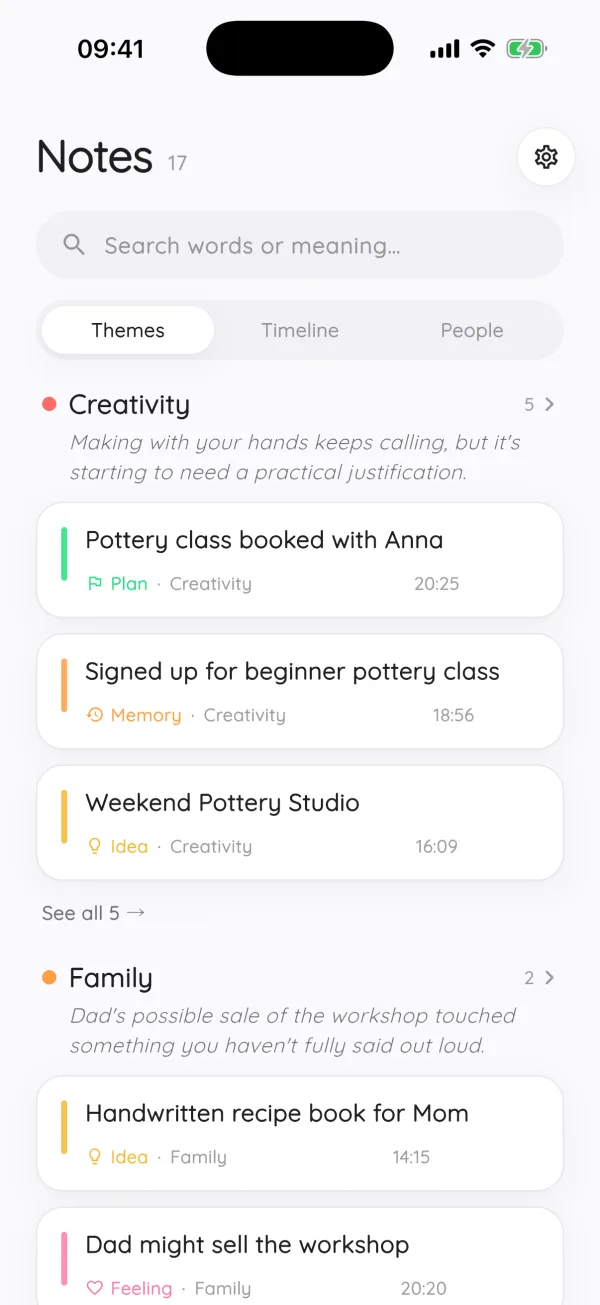
If filing is the part you never do, an app that organizes automatically may suit you better. Modopodo is built around this: you speak or type a thought, and it gives the note a title, a short summary, a kind (idea, plan, question, reflection and so on), a theme, tags, and the people, places and projects it mentions. You can browse by theme, as a timeline or by person, and search by meaning as well as by exact words. When it files something wrong, you change the theme or kind, rename or merge themes, and future notes follow your corrections. Your notes can be exported as Markdown at any time.
It is designed for personal thinking, not as a team wiki, task manager or document archive, and it doesn’t import images, PDFs or handwriting. For project files and shared documents, a folder-based tool is still the better fit.
Frequently asked questions
What is the best way to organize notes?
The best way is the simplest system you will keep using. For most people that means a few broad folders, a short fixed list of tags and good search. If you won’t file notes at all, an app that organizes them automatically may work better.
How do I organize a lot of messy notes?
Back up first, then move everything you haven’t touched in a few months into a single archive without sorting it. Sort only recent notes in short sessions, merge duplicates and rename vague titles. Finish by setting one capture rule and a ten-minute weekly tidy.
Is it better to organize notes with folders or tags?
Use a few broad folders for separate areas of life and tags for topics that overlap. Tags handle notes that belong in more than one place, while folders are simpler to browse. Good search matters more than either.
What is the PARA method for notes?
PARA is a system by Tiago Forte that sorts information into Projects, Areas, Resources and Archives based on how actionable it is. It works well for work and projects, though personal reflections and loose thoughts can be harder to place.
Is Zettelkasten worth it?
It can be if you research, write or want to build deep understanding of a topic over years. Each note holds one idea and links to others, which takes more effort per note. For quick capture or journaling, a lighter system is usually more practical.
Can AI organize my notes automatically?
Yes. Some apps use AI to title, tag and group notes as you capture them and let you search by meaning. You trade some control for much less filing, so look for an app that lets you correct its choices and export your notes.